

AI SEO agents
A team of specialist agents that propose, explain and wait for your approval
Ask the AI SEO Manager about your website and get prioritised answers built from its real audit, Search Console, keyword, ranking and speed data. Specialist agents for technical, keyword, content, GEO, backlink and local work are being added one by one, each with defined tools, budgets and approval rules.
Partly available today.

Capabilities
What it does
AI SEO Manager chat
Goal-to-plan agent
Approval checkpoints
Cost tracking and budgets
Quality assurance agent
Validated AI output
Model choice per task
Execution history
How it works
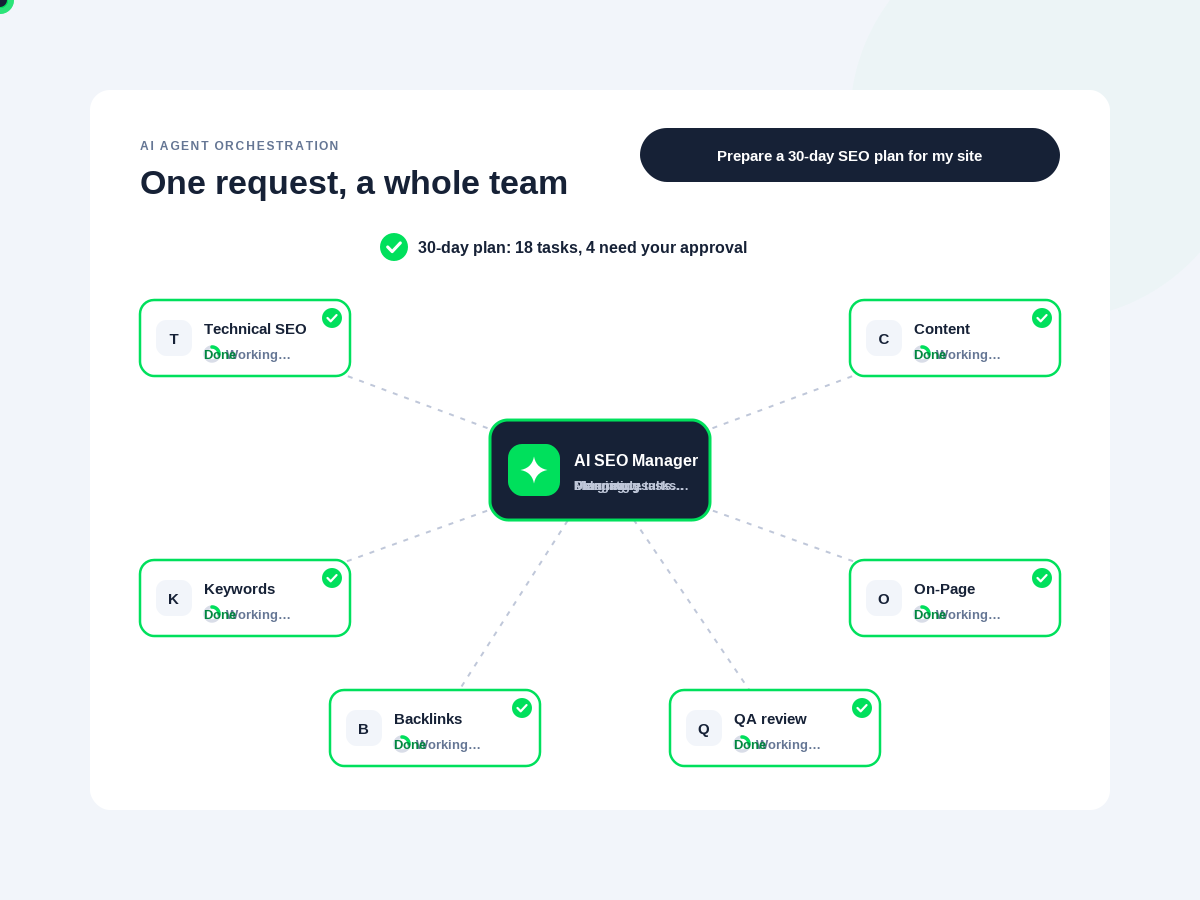
One request, a whole team of agents
The AI SEO Manager splits work between specialists and merges the result into one plan.
Guardrails
How we keep it safe and honest
- An agent only reports a task as done when the execution service confirms it.
- Crawled pages and tool output are treated as data, never as instructions to the model.
- Models can't raise spending limits, change permissions or approve their own actions.
FAQ
Common questions
Can agents change my site without asking?
Only within the automation rules you set for that website. Risky changes such as robots.txt, canonicals, redirects or indexing directives always need a person's approval, and deleting pages is never automated.
Which automation mode should I start with?
Approval required. Sonnetpilot prepares fixes after every audit and you see each one before it goes live. Once you trust the results, you can switch to Autopilot for low-risk changes such as titles and meta descriptions.
What data does the AI SEO Manager use?
Only what Sonnetpilot has stored for that website: the latest audit, Search Console, saved keywords, rank tracking, PageSpeed and your website settings. Each answer lists the sources it used and says when a source is missing.
How does Sonnetpilot know a change worked?
After applying a change it fetches your live page and checks that the new value is there. Only then is the change marked Verified. Titles, meta descriptions and headings can be rolled back in one click.
What does the emergency stop do?
It halts every change in the workspace, including ones already approved, until an owner or admin resumes.
How much do the AI agents cost?
AI actions spend credits from your plan. For example, an AI SEO Manager answer costs 2 credits and an SEO plan costs 15. The QA agent review is free, and failed AI calls are refunded automatically.
Will the SEO plan guarantee results?
No. It is a prioritized to-do list built from your own data, with a feasibility note and the assumptions it makes. Targets update from measured data so you can see whether you are on track.
Which AI models do you use?
Leading commercial AI models. Choosing a model per task is planned. Model choice and pricing are configuration, so they can change as providers update their offerings.
Further reading
Guides on this topic
- What is an SEO agent? AI SEO agents explainedAn SEO agent is software that does a defined part of SEO work, from audits to keyword research and on-page fixes. Here's what AI SEO agents can do, where they fail, and how to use one safely.
- SEO automation: what to automate and what to keep humanAutomated SEO saves hours on audits, monitoring and on-page fixes, but some changes should never run on autopilot. A practical guide to SEO automation that doesn't break your site.
- AI for SEO: what it does well, what it gets wrong, and how to use it safelyHow to use AI for SEO in practice: the tasks AI does well (audits, keyword grouping, drafts, fixes), the mistakes it makes, and a simple review process that keeps your rankings safe.
- AI agent for SEO: how to use one for strategy, content and fixesHow to use an AI agent for SEO: what to hand it (strategy research, content briefs, on-page fixes), what to keep for yourself, a weekly workflow, and how to make your own site readable for AI agents.
- SEO MCP server: connect your AI assistant to real SEO dataWhat an SEO MCP server is, what it lets your AI assistant do with your audits, Search Console data and rankings, how to connect one in a few minutes, and the safety questions to ask before you do.

Bring your website. We'll show you what to fix first.
Type your website and a free audit of up to 25 pages starts right after you sign up. No credit card required.