

Find your way around the dashboard
Updated
Quick answer
The side menu has workspace pages at the top (Overview, Websites) and, below them, every section of the website you're working on, grouped into Start, Autopilot, SEO, AI Search (AEO & GEO), Results and Setup. Your account menu sits under your avatar in the top right.
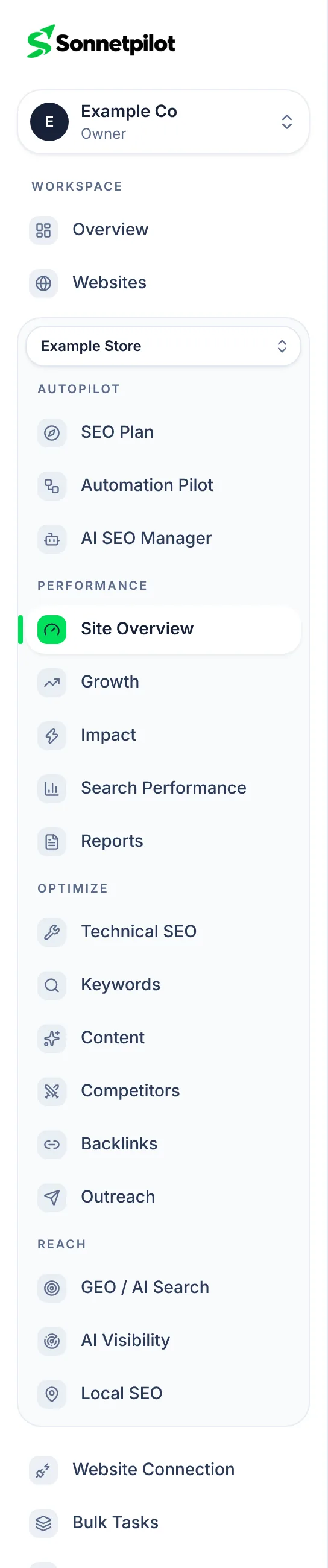
- 1Workspace switcher: shows each workspace’s plan and credits; move between workspaces or create a new one.
- 2The website you are working on. With several sites, switch here and stay on the same section.
- 3Autopilot: SEO Plan, Automation Pilot, Site Editor and AI SEO Manager.
- 4Performance: Site Overview, Growth, Impact, Search Performance, Reports.
- 5Optimize: Technical SEO, Keywords, Content, Competitors, Backlinks, Outreach.
Screenshot from the Sonnetpilot app (a new workspace, before any data was collected). Open full size
Website sections
- Start: Site Overview, SEO Plan.
- Autopilot: Automation Pilot, Site Editor, AI SEO Manager.
- SEO: Technical SEO, Keywords, Content, Local SEO, Competitors, Backlinks, Outreach.
- AI Search (AEO & GEO): AI Search Readiness, AI Visibility.
- Results: Search Performance, Growth, Impact, Reports.
- Setup: Website Connection, Website Monitoring and Site Settings.
The workspace part of the menu holds Overview, Websites, Approvals (changes waiting on every website), Bulk Tasks and Team.
Switching websites
The website sections always show the site you're on, else the last one you opened. With several sites, use the switcher above the groups: it changes the site and keeps you on the same section. Website pages have readable addresses such as /app/websites/example/reports.
The account menu
Click your avatar (top right) for Your Account, Choose a Plan, Buy Credits, Billing, Work History, Activity, Settings, the Light / Dark / Auto theme, Help and Sign out. On phones, a button at the top of each website page opens the section menu.
Frequently asked questions
Where are Approvals and Website Connection?
Approvals, the inbox of changes waiting on every website, is in the workspace part of the side menu. Website Connection is under Setup in each website's menu, next to Website Monitoring and Site Settings.
Where did the website's settings go?
Goals, markets, brand voice, verification history and deleting a website moved from Site Overview to Site Settings, under Setup in the website menu.
Where are Billing, Activity and Settings?
In the account menu under your avatar in the top right.
Related guides
- Getting started with SonnetpilotSet up Sonnetpilot in about 15 minutes: create an account, add and verify your website, run the first audit and connect your data.
- Website settings: goals, audience and brand voiceTell Sonnetpilot your markets, SEO goals, audience, brand voice and competitors so audits, plans and AI drafts fit your business.
Something unclear or out of date? Tell us and we'll fix the guide.